


NEW PRODUCT | LOW STOCK
Q08 Mini Gimbal Anti-Shake 1-Axis STABILIZER Extendable Selfie Stick Tripod, Wireless Remote for Smartphone, Black
Q08 Mini Gimbal Anti-Shake 1-Axis STABILIZER Extendable Selfie Stick Tripod, Wireless Remote for Smartphone, Black
🚚 Fast Delivery
✅ Quality Guaranteed
🎁 Special Offers
🔄 Easy Returns
1-2 Days Fast Delivery
Couldn't load pickup availability
Q08 Mini Gimbal Anti-Shake 1-Axis STABILIZER Extendable Selfie Stick Tripod, Wireless Remote for Smartphone, Black


🔥Free Shipping On All Orders🚚
🔥Free Shipping On All Orders🚚
🔥Free Shipping On All Orders🚚
🔥Free Shipping On All Orders🚚
🔥Free Shipping On All Orders🚚
🔥Free Shipping On All Orders🚚
🔥Free Shipping On All Orders🚚
🔥Free Shipping On All Orders🚚
🔥Free Shipping On All Orders🚚
🔥Free Shipping On All Orders🚚
🔥Free Shipping On All Orders🚚
🔥Free Shipping On All Orders🚚
🔥Free Shipping On All Orders🚚
🔥Free Shipping On All Orders🚚
🔥Free Shipping On All Orders🚚
🔥Free Shipping On All Orders🚚
PRODUCT DESCIPTION
About this item
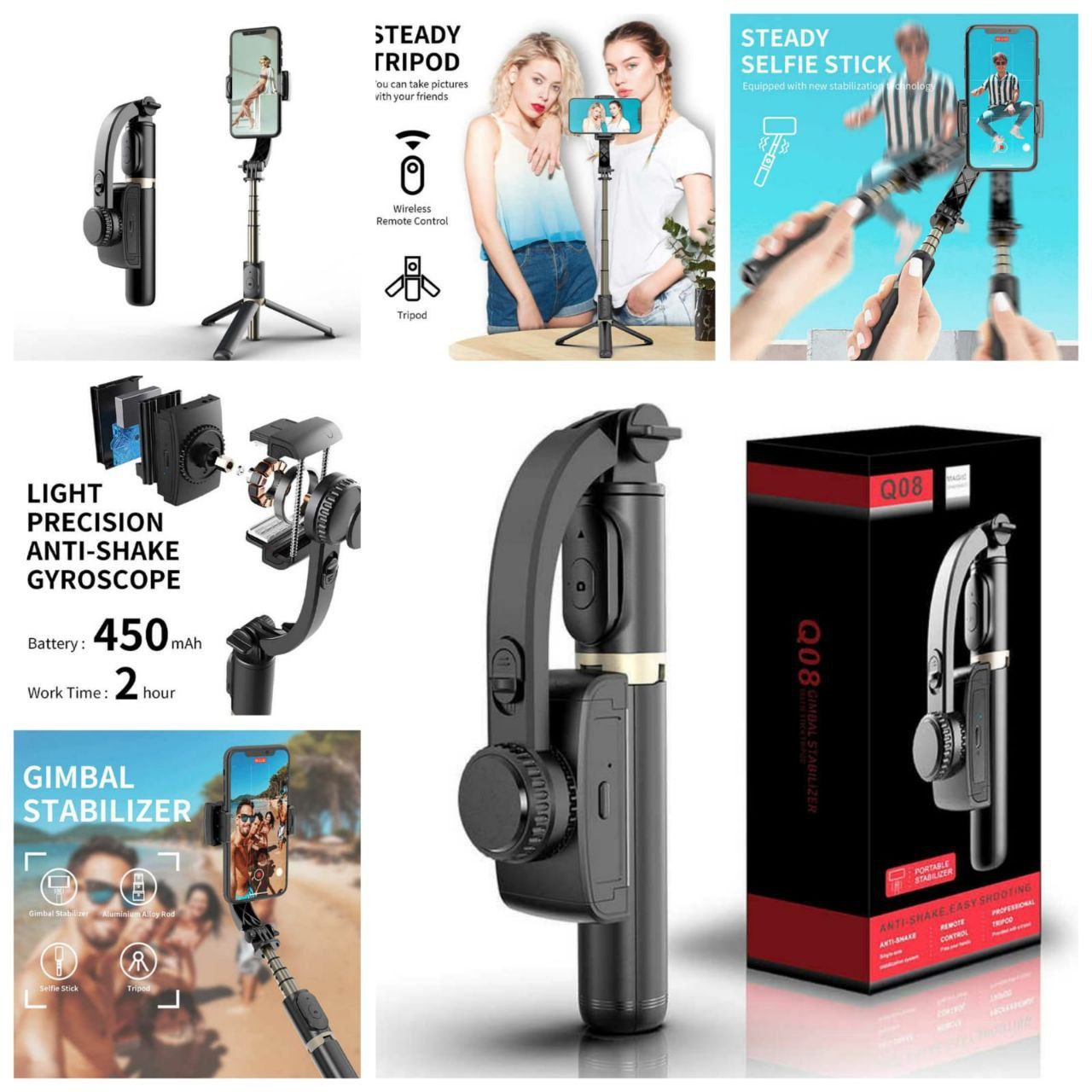
- 3-in-1 : This multifunctional device can be used three ways - the self-locking clasp makes it easy to use this as a selfie stick; the extendable legs with non-slip grip convet into a convenienet phone tripod; and it also can be used as a single axis phone gimbal stabilizer
- Bluetooth Remote : Bluetooth 4.2 compatible and comes with a removable remote and can be operated from a distance of 10M.
- Easy To Operate Stablisier : Turn on the switch on the stabilizer to use it
- Great Battery Performance, Easily Rechargeable: With a high quality 450 mAh Lithium rechargeable battery inside, this gimbal stabilizer can support up to 2 hours of continuous use after a 1.5-hour full charge. With the universally compatible USB interface, you can easily recharge it with any power sources such as computers, power outlets or power ban
- Intelligent Button & Free Rotation: It comes with a 360°degree flexible and adjustable clip head with an intelligent button, you can change the position of the clip head easily by pressing the button, which will free you from tedious and time consuming manual operation, allows you to find the best angle for your shots. Super practical and easy to use.
- Mobile phone tripod: Open the handheld part of the stabilizer and place it on the desktop to become a mobile phone tripod.Adjust the height of the four-section aluminum alloy rod to choose the right position for you. Watch the video, shoot the video,Featured with beauty retouching, enlarge your charm in the video.
- The built-in foldable legs
- Easy To Carry : The gimbal is lightweight and folds into a compact size that fits easiy into most bags and is travel friendly.
- You can use this gimbal both indoor and outdoor.
GIMBAL STABILIZER FOR SMARTPHONE
The 1-Axis GIMBAL STABILIZER FOR SMARTPHONE is born for filming your live. Everyone can direct his/her own interesting VLOG.
This junior Single-Axis Gimbal Stabilizer for smartphone is suitable for novices,We don't recommend use it as a professional stabilizer.
Grip the gimbal, go out to record & share what you saw & how you feel about this world, without hesitation & fuzzy.Everyone can be a director easily.

Do you have the following troubles:
1. You want to professionally shoot the scenery and the wide range of changes over a long period of time, but there is no professional equipment or the equipment is too heavy to carry.
2. You want to shoot yourself a VLOG, but you haven't found a small professional device which is easy to operate, automatically follow you, and record your life naturally and smoothly.

Get a gimbal stabilizer, your troubles will no longer exist.
· None of shake - No matter how rough the road you are walking, no matter how fast of your speed, just keep you video stable and record every moment without missing. Your life is so wonderful that should no
Switch from Horizontal to Vertical Level
Easily horizontal to vertical level to mount your phone in order to take every selfie shot or live your story without any limitation.

Auto Balance
The gimbal is auto balanced to prevent device shaking and image blur. You can also be a Professional Director, From fast moving action, like sports, to vlogs and interviews, to documentaries and independent features, the gimbal stabilizer design sophistication and convertibility make it a unique production tool.

360° Free Rotation
SelfieShow selfie stick can be rotated 360 degrees. Thanks to the gimbal stabilizer upside-down detection and rotation technology, the smartphone gimbal stabilizer can rotate your phone You can shoot with your phone even at the extremely low angle such as beneath the subject and look straight up at it.

First of all, you need to know the function of the buttons on the device.
There is a Mode Change Button behind the clip head and a Intelligent Button beside the clip head.

Gimbal Mode:
- When you need to use the Gimbal mode, you need to unlock the mode change button first.
- And long press the intelligent button, when the light turns green, the Gimbal Mode is active.
- And then you just need to short press the intelligent button to change the position you want.
Selfie Stick Mode:
- When you need to use the Selfie Stick Mode, you need to make sure that the Gimbal Mode is off.
- If the light is green, you need to long press the intelligent button to turn off the Gimabl Mode. If the light is dark, it means the Gimbal Mode is already off.
- And then put the clip head to the position you want and lock the mode change button to fix the position.
Customers Review's
-
★★★★★

Amazing!
“Product quality is amazing, exactly as described. Delivery was fast too. Happy with Amazondealer!”
-
★★★★★
User Friendly!
"I love how simple to use this store and this will be amazing for me.''
-
★★★★★
So Much Good!
"This store has wow prices then other prices i love it.''
-
★★★★★
Trustworthy!
“Trustworthy store! Prices are better than other websites, and the customer support is really helpful.”
-
★★★★★
Satisfied!
“Excellent service, very professional. I’ve ordered twice from Amazondealer and both times I was satisfied.”
-
★★★★★
Fast Delivery!
''I Really Recomend to every one for good experience.''
